


Employees will use the employee portal to enter their timesheets and leave applications. It can also be configured for them to update their personal details, download pay advices, placement information and company documents, and also upload additional documents.
Welcome E-mail
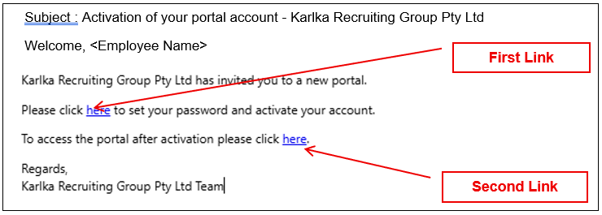
Activation
Please click the first link to activate your account and set your password.
If the link has expired, the system will automatically resend an activation email after you click on the expired link. You have 24 hours before the link expires.
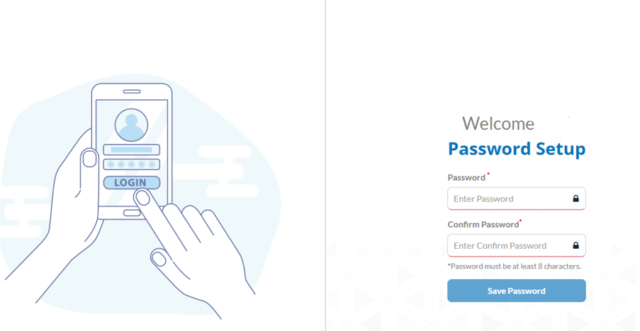
This link opens the page below to set a password (minimum 8 characters)
You will be able to set up a password to access the system (minimum 8 characters)
Log in
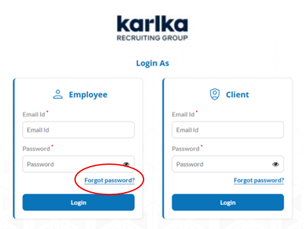
Once you have activated your account, you can select the second link to log in.
Or follow this link: https://krg-portal.workforceone.com.au/employee/#/login
This system requires 2FA which will be sent to your registered e-mail address
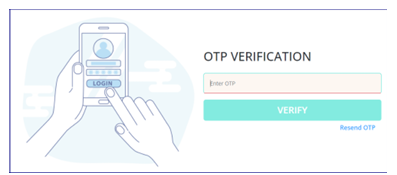
You will be prompted to enter the verification code to complete the login process, to do this open your email to copy the code and enter in the login screen
2FA will allow you to access for 24hrs before a new code is required.
What if you do not receive OTP Verification?
- If you have not left the page, press Resend OTP
- If you have left that page, go back to the login page and put your login details in again and resend OTP
Please flag or save the Activation e-mail for the portal link.
Deactivated Account
Where a user has had 3 incorrect attempts at entering their credentials the system will automatically deactivate their account. To reactivate your account if this has occurred, please contact us via the contact details below.
The user can use the Forgot password option in the login screen to reset their password.
Want to log in on your phone or other mobile device?
There is no mobile version, however you can create a link to your phone home screen – see Candidate and Client Portal – URL Shortcut on how to do this. The display will adjust to the device.
The link to save is https://krg-portal.workforceone.com.au/employee
This takes you directly to the employee login screen.
Contact Details
For timesheet and pay enquiries: timesheets@karlkarecruiting.com.au
For general enquiries or if you are unsure: recruitment@karlkarecruiting.com.au, 1300 833 989.
We care about your success
Our expert team can guide and support you.